End of Life — Legacy Version
Urbano v1 has reached end of life and is no longer actively maintained. This documentation is kept for reference only. We recommend using Urbano v2 for active projects.
Go to Urbano v2 Import Shapefile Features
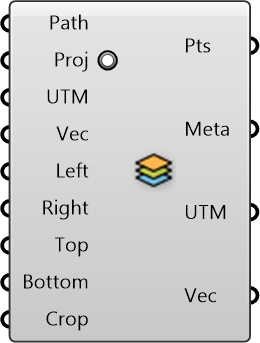
Import data from GIS shapefiles
Inputs
-
Path []
Specify the path to the shapefile (.shp) -
Proj []
Change the map projection to WGS84 datum (recommended), default is true -
UTM []
UTM Zone of the given region (can be used along with translation vector) to transform data from different sources to a common origin) -
Vec []
Translation vector to move from actual UTM window to working origin (can be used to transform data from different sources to a common origin) -
Left []
Left Bound (Longitude, x-axis) of the OSM region -
Right []
Right Bound (Longitude, x-axis) of the OSM region -
Top []
Top Bound (Latitude, y-axis) of the OSM region -
Bottom []
Bottom Bound (Latitude, y-axis) of the OSM region -
Crop []
Cropping Geometry
Outputs
-
Pts
Points representing the features (could form polyline, polygon, or single point) depending on what is imported -
Meta
Serializable dictionary with string keys and arbitrary values -
UTM
UTM Zone of the given region (can be used along with translation vector) to transform data from different sources to a common origin) -
Vec
Translation vector to move from actual UTM window to working origin (can be used to transform data from different sources to a common origin)